
3 differences between Savepoints and Checkpoints in Apache Flink
In the following paragraphs, we explain what Savepoints are, when they should be used and give a side-by-side comparison on how they differ to Checkpoints.
What are Savepoints and Checkpoints in Apache Flink?
An Apache Flink Savepoint is a feature that allows you to take a “point-in-time” snapshot of your entire streaming application. This snapshot contains information about where you are in your input as well as information about all the positions of the sources and the state of the entire application. We can get a consistent snapshot of the entire state without stopping the application with a variant of the Chandy-Lamport algorithm. Savepoints contain two main elements:
- First, Savepoints include a directory with (typically large) binary files that represent the entire state of the streaming application at the point of the Checkpoint/Savepoint image and
- A (relatively small) metadata file that contains pointers (paths) to all files that are part of the Savepoint and are stored in your selected distributed file system or data storage.
All the above about Savepoints sound very familiar to what we explained about Checkpoints in Apache Flink in an earlier post. Checkpointing is Apache Flink’s internal mechanism to recover from failures, consisting of the copy of the application’s state and including the reading positions of the input. In case of a failure, Flink recovers an application by loading the application state from the Checkpoint and continuing from the restored reading positions as if nothing happened.
3 differences between Savepoints and Checkpoints in Apache Flink
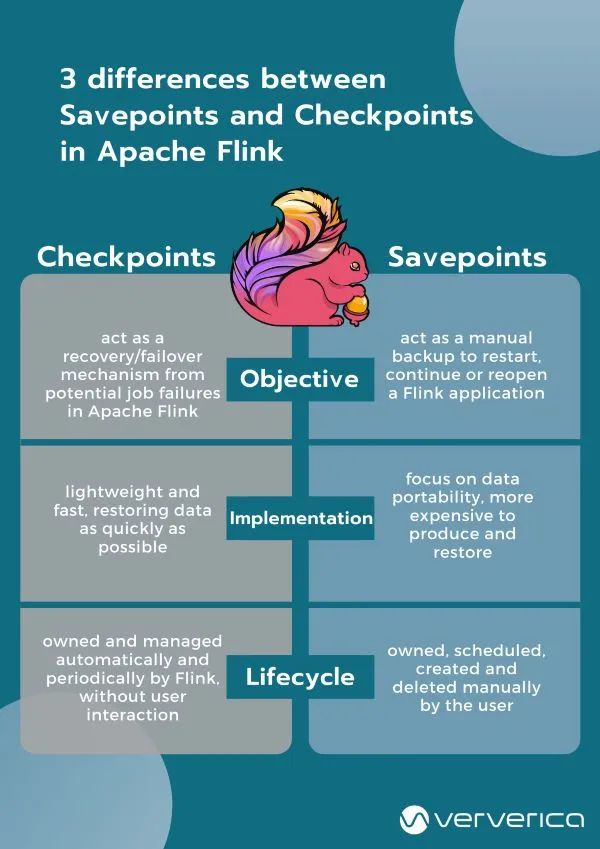
Checkpoints and Savepoints are two features quite unique to Apache Flink as a stream processing framework. Both Savepoints and Checkpoints might look similar in their implementation, however, the two features are different in the following 3 ways:
- Objective: Conceptually, Flink's Savepoints are different from Checkpoints in a similar way that backups are different from recovery logs in traditional database systems. Checkpoints’ primary objective is to act as a recovery mechanism in Apache Flink ensuring a fault-tolerant processing framework that can recover from potential job failures. Conversely, Savepoints’ primary goal is to act as the way to restart, continue or reopen a paused application after a manual backup and resume activity by the user.
- Implementation: Checkpoints and Savepoints differ in their implementation. Checkpoints are designed to be lightweight and fast. They might (but don’t necessarily have to) make use of different features of the underlying state backend and try to restore data as fast as possible As an example, incremental Checkpoints with the RocksDB State backend use RocksDB’s internal format instead of Flink’s canonical (backend-independent) format. This is used to speed up the checkpointing process of RocksDB that makes them the first instance of a more lightweight Checkpointing mechanism. On the contrary, Savepoints are designed to focus more on the portability of data and support any changes made to the job that make them slightly more expensive to produce and restore.
- Lifecycle: Checkpoints are automatic and periodic in nature. They are owned, created and dropped automatically and periodically by Flink, without any user interaction, to ensure full recovery in case of an unexpected job failure. On the contrary, Savepoints are owned and managed (i.e. they are scheduled, created, and deleted) manually by the user.
When to use Savepoints in your streaming application?
Although a stream processing application processes data that is continuously produced (data “in-motion”), there are instances where an application might need to reprocess data that has been previously processed. Savepoints in Apache Flink allow you to do so in cases such as:
- Deploying an updated version of your streaming application including a new feature, a bug fix, or a better machine learning model
- Introducing A/B testing for your application, testing different versions of your program using the same source data streams, starting the test from the same point in time without sacrificing prior state
- Rescaling your application in case more resources are necessary
- Migrating your streaming applications to a new release of Apache Flink, or upgrading your application to a different cluster.
Conclusion
Checkpoints and Savepoints are two different features in Apache Flink that serve different needs to ensure consistency, fault-tolerance and make sure that the application state is persisted both in case of unexpected job failures (with Checkpoints) as well as in cases of upgrades, bug fixes, migrations or A/B testing (with Savepoints). The two features combined have you covered in different instances ensuring that your application’s state is persisted in different scenarios and circumstances. Real-time regulatory reporting is a typical case: a corrected calculation can be redeployed from a savepoint without losing the state built up so far.
Frequently Asked Questions
What is the difference between a checkpoint and a savepoint in Flink?
Checkpoints are Apache Flink's internal recovery mechanism: lightweight, fast, and created and dropped automatically by Flink to recover from job failures. Savepoints are owned and managed manually by the user and focus on portability, so a paused or changed application can be restarted from them. The difference is similar to recovery logs versus backups in traditional database systems.
What is a savepoint in Apache Flink?
An Apache Flink savepoint is a point-in-time snapshot of an entire streaming application, including the positions of the sources and the state of the whole application. It consists of a directory of (typically large) binary state files and a small metadata file with pointers to all files that are part of the savepoint.
What is a checkpoint in Apache Flink?
Checkpointing is Apache Flink's internal mechanism to recover from failures, consisting of a copy of the application's state including the reading positions of the input. After a failure, Flink loads the state from the checkpoint and continues from the restored reading positions as if nothing happened.
When should I use a savepoint in Flink?
Use a Flink savepoint when you deploy an updated version of your application, run A/B tests from the same point in time, rescale the application, or migrate to a new Apache Flink release or a different cluster. Savepoints let the application continue from its prior state in these cases.
Why are Flink savepoints more expensive than checkpoints?
Flink savepoints focus on data portability and on supporting changes made to the job, which makes them slightly more expensive to produce and restore. Checkpoints can use backend-specific features instead; for example, incremental checkpoints with the RocksDB state backend use RocksDB's internal format rather than Flink's canonical format.