
Flink SQL: Detecting patterns with MATCH_RECOGNIZE

Flink SQL has emerged as the de facto standard for low-code data analytics. It has managed to unify batch and stream processing while simultaneously staying true to the SQL standard. In addition, it provides a rich set of advanced features for real-time use cases. In a nutshell, Flink SQL is the best of both worlds: it gives you the ability to process streaming data using SQL, but it also supports batch processing.
Ververica Platform makes Flink SQL even more accessible and efficiently scalable across teams. The platform comes with additional tools for developing SQL scripts, managing user-defined functions (UDFs), catalogs and connectors, as well as operating the resulting long-running queries.
We have seen that there are many use cases for Flink SQL, and we are excited to see what you will build with it. In this blog post, we will show you what you can do with the MATCH_RECOGNIZE function.
What is MATCH_RECOGNIZE?
MATCH_RECOGNIZE is a clause in the SQL standard that allows you to detect patterns in your data. It is similar to the regular expression functionality in many programming languages.
MATCH_RECOGNIZE allows you to:
- Define patterns
- Match data against those patterns
- Extract parts of the data that match the patterns
- Perform actions on the data that match the patterns
For example, you could use MATCH_RECOGNIZE to find all the rows in a table that represent a stock price trend. You could then extract the data that matched the pattern and perform further analysis on it.
A common (but historically complex) task in SQL day-to-day work is to identify meaningful sequences of events in a data set — also known as Complex Event Processing (CEP). This becomes even more relevant when dealing with streaming data because you want to react quickly to known patterns or changing trends to deliver up-to-date business insights. In Flink SQL, you can easily perform this kind of task using the standard SQL clause MATCH_RECOGNIZE.
An example of how to use MATCH_RECOGNIZE
In this example, you will use Flink SQL and MATCH_RECOGNIZE to find users that downgraded their service subscription from one of the premium tiers (type IN ('premium ',' platinum')) to the basic tier.
The full Flink SQL query
The source table (subscriptions) is backed by the faker connector, which continuously generates rows in memory based on Java Faker expressions.
CREATE TABLE subscriptions (
    id STRING,
    user_id INT,
    type STRING,
    start_date TIMESTAMP(3),
    end_date TIMESTAMP(3),
    payment_expiration TIMESTAMP(3),
    proc_time AS PROCTIME()
) WITH (
  'connector' = 'faker',
  'fields.id.expression' = '#{Internet.uuid}',
  'fields.user_id.expression' = '#{number.numberBetween ''1'',''50''}',
  'fields.type.expression'= '#{regexify ''(basic|premium|platinum){1}''}',
  'fields.start_date.expression' = '#{date.past ''30'',''DAYS''}',
  'fields.end_date.expression' = '#{date.future ''15'',''DAYS''}',
  'fields.payment_expiration.expression' = '#{date.future ''365'',''DAYS''}'
);

SELECT *
FROM subscriptions
     MATCH_RECOGNIZE (PARTITION BY user_id
                      ORDER BY proc_time
                      MEASURES
                        LAST(PREMIUM.type) AS premium_type,
                        AVG(TIMESTAMPDIFF(DAY,PREMIUM.start_date,PREMIUM.end_date)) AS premium_avg_duration,
                        BASIC.start_date AS downgrade_date
                      AFTER MATCH SKIP PAST LAST ROW
                      --Pattern: one or more 'premium' or 'platinum' subscription events (PREMIUM)
                      --followed by a 'basic' subscription event (BASIC) for the same `user_id`
                      PATTERN (PREMIUM+ BASIC)
                      DEFINE PREMIUM AS PREMIUM.type IN ('premium','platinum'),
BASIC AS BASIC.type = 'basic');Input
The input argument of MATCH_RECOGNIZE will be a row pattern table based on subscriptions. As a first step, logical partitioning and ordering must be applied to the input row pattern table to ensure that event processing is correct and deterministic:
PARTITION BY user_id
ORDER BY proc_timeOutput
Row pattern columns are then defined in the MEASURES clause, which can be thought of as the SELECT of MATCH_RECOGNIZE. If you're interested in getting the type of premium subscription associated with the last event before the downgrade, you can fetch it using the logical offset operator LAST. The downgrade date can be extrapolated from the start_date of the first basic subscription event following any existing premium one(s).
The AFTER MATCH SKIP clause specifies where pattern matching resumes after a non-empty match is found. The default option is AFTER MATCH SKIP PAST LAST ROW, which specifies that pattern matching starts from the row after the last row of the match.
MEASURES
  LAST(PREMIUM.type) AS premium_type,
  AVG(TIMESTAMPDIFF(DAY,PREMIUM.start_date,PREMIUM.end_date)) AS premium_avg_duration,
  BASIC.start_date AS downgrade_date
AFTER MATCH SKIP PAST LAST ROWPattern Definition
Patterns are specified in the PATTERN clause using row-pattern variables (i.e. event types) and regular expressions. These variables must also be associated with the matching conditions that events must meet to be included in the pattern, using the DEFINE clause. Here, you are interested in matching one or more premium subscription events (PREMIUM+) followed by a basic subscription event (BASIC):
PATTERN (PREMIUM+ BASIC)
DEFINE PREMIUM AS PREMIUM.type IN ('premium','platinum'),
BASIC AS BASIC.type = 'basic');Ververica Platform SQL Editor
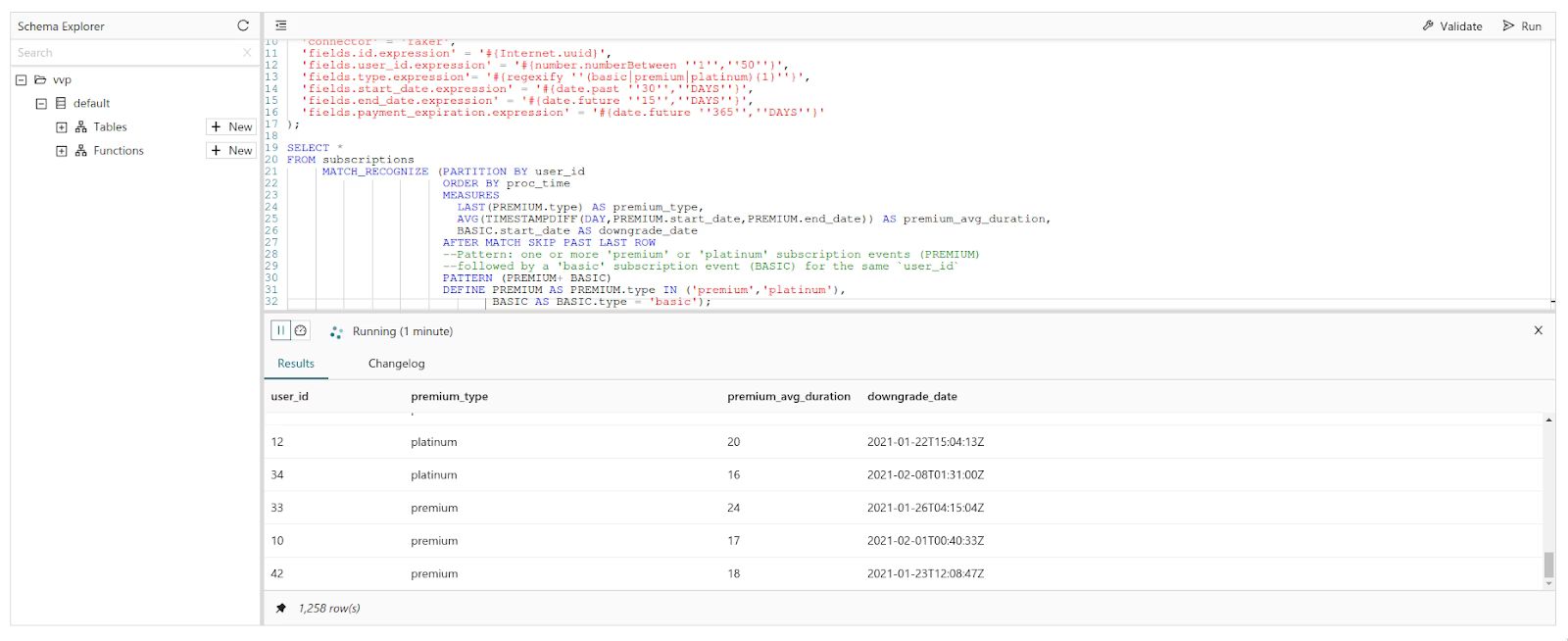
This is how the query looks when executed in the Ververica Platform SQL editor:
Conclusion
In this article, you learned about detecting patterns with the MATCH_RECOGNIZE function. You also saw how to use Flink SQL to write queries for this type of problem.
Frequently Asked Questions
What is MATCH_RECOGNIZE in Flink SQL?
MATCH_RECOGNIZE is a clause in the SQL standard that detects patterns in data, similar to regular expressions in many programming languages. In Flink SQL it lets you define patterns, match data against them, extract the matching parts and act on them.
How do I do complex event processing (CEP) in Flink SQL?
Identifying meaningful sequences of events, known as Complex Event Processing (CEP), can be done in Flink SQL with the standard SQL clause MATCH_RECOGNIZE. This is especially useful on streaming data, where you want to react quickly to known patterns or changing trends.
How do PATTERN and DEFINE work in Flink SQL MATCH_RECOGNIZE?
The PATTERN clause specifies the pattern using row-pattern variables (event types) and regular expressions, for example PREMIUM+ BASIC for one or more premium events followed by a basic one. The DEFINE clause sets the conditions an event must meet to be assigned to each variable.
What does the MEASURES clause do in MATCH_RECOGNIZE?
The MEASURES clause defines the output columns of a pattern match and can be thought of as the SELECT of MATCH_RECOGNIZE. It can use logical offset operators such as LAST to fetch values from specific events in the match.
What is AFTER MATCH SKIP PAST LAST ROW in Flink SQL?
The AFTER MATCH SKIP clause specifies where pattern matching resumes after a non-empty match is found. The default, AFTER MATCH SKIP PAST LAST ROW, resumes matching from the row after the last row of the match.